
When a contact leaves a sequence before all its steps are done, their badge says Stopped. You can now see why.
How to check
Open a sequence, go to the Metrics tab and hover the Stopped badge next to a contact. The tooltip says "The sequence was stopped before all steps were completed" and gives the reason.
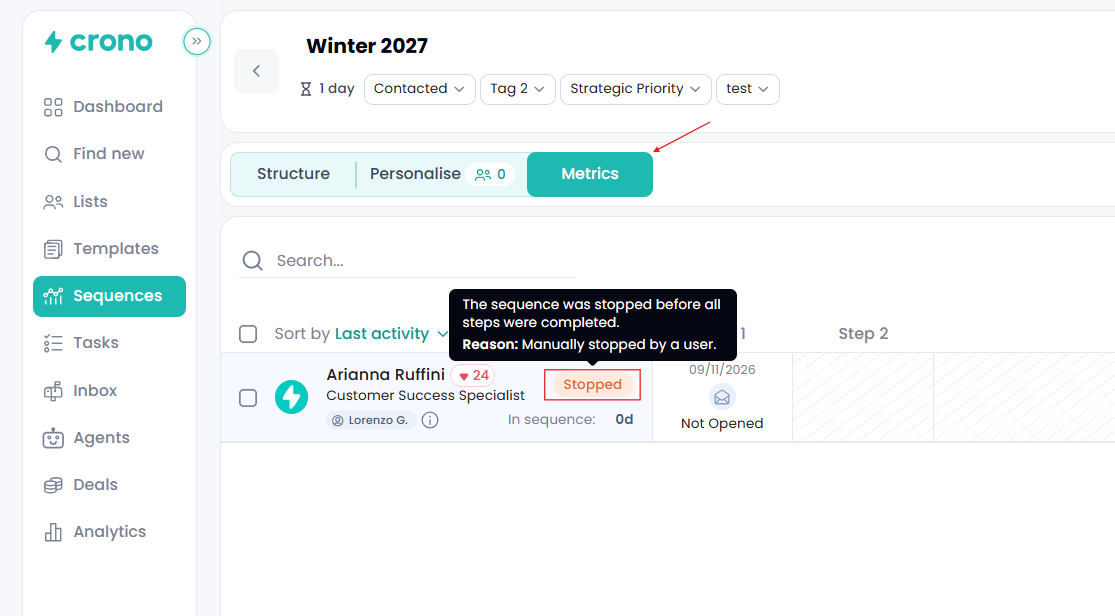
Possible reasons
Stopped by a person or an integration
Manually stopped by a user, in the app or when logging an activity.
Stopped through the Crono API.
Stopped by what happened with the contact or company
The contact replied. This appears on colleagues at the same company: when someone replies, their own badge shows Replied.
A meeting was booked.
A deal was created.
The contact unsubscribed.
The contact moved to another company.
The contact's owner changed.
The contact was merged into a duplicate that's already in a sequence.
Stopped because of a change to the sequence or account
The sequence was deleted or archived. Unarchiving doesn't restart it.
The sequence had no active steps left.
The sending mailbox was disconnected.
The sequence owner was deactivated.
Stopped by an automation rule
These start with "Automation rule –" and name what triggered the rule: a company status change, an opportunity stage change, a contact field change, a connected call, a bounced email, an accepted LinkedIn invitation, the contact being added to a list, a signal, or another rule trigger.
Note: an automation rule stops the sequences of every contact at the same company, not just one contact.
Good to know
Only Stopped badges have the tooltip; Active, Finished, Replied and Converted don't.
If no reason was recorded, for example for contacts stopped before this feature, the badge has no tooltip.