Crono’s CRM integration is extremely flexible and customizable.
One of the available setups is fully automatic and bidirectional: every record assigned to a Crono user in your CRM is imported into Crono, and every contact or company created in Crono is created in your CRM.
You decide how your CRM and Crono exchange data.
From Account Settings → CRM, the subscription manager can choose the sync mode that best fits your team’s workflow:
Crono to CRM
Automatic – Keep data up to date in real time, with no manual steps required.
Manual – Choose exactly which contacts or companies to sync, and when.
Trigger-Based – Automate data syncs based on specific conditions, combining automation with control.
CRM to Crono
Automatic - Anything assigned to you in the CRM is automatically synced to Crono
Manual - Select what to push from the CRM to Crono.
This gives your team the freedom to tailor CRM synchronization to your operational style — whether you want full automation, selective control, or smart rule-based syncing.

When Automatic Sync is enabled, Crono and your CRM stay aligned in real time.
Any contact or company created in Crono is automatically created in your connected CRM.
This is ideal for teams that prefer a frictionless, always-up-to-date connection between systems.
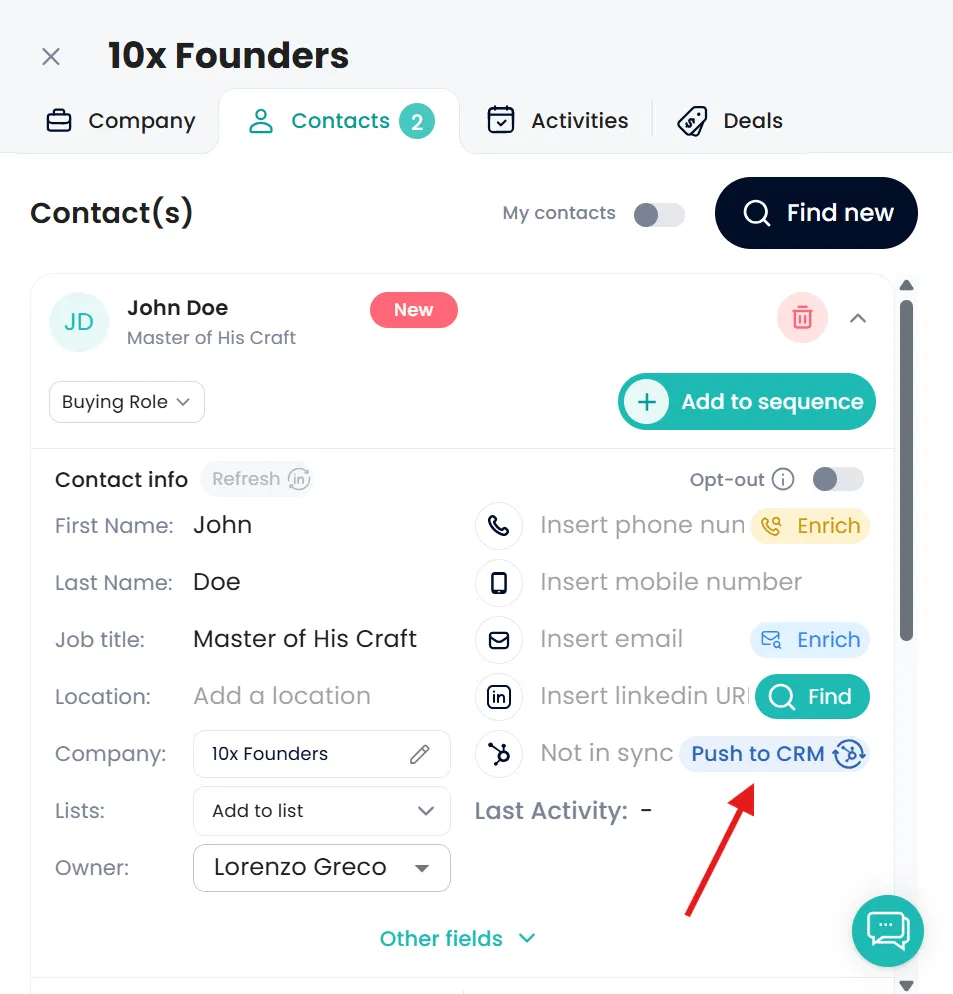
With Manual Push, you decide what to sync and when.
Simply open any contact or company card in Crono and click “Push to CRM” to create that record in your connected CRM instantly.
This setup is best for teams who want to keep their CRM focused only on relevant, qualified data.
The Trigger-Based Automation mode gives you the best of both worlds — automation with precision. You can define specific rules that automatically push data when conditions are met.
This lets you automate repetitive tasks while keeping control over what gets synced, reducing human error and keeping your CRM clean and reliable.
How to set it up
Go to Settings → Integrations.
Open the Crono to CRM card.
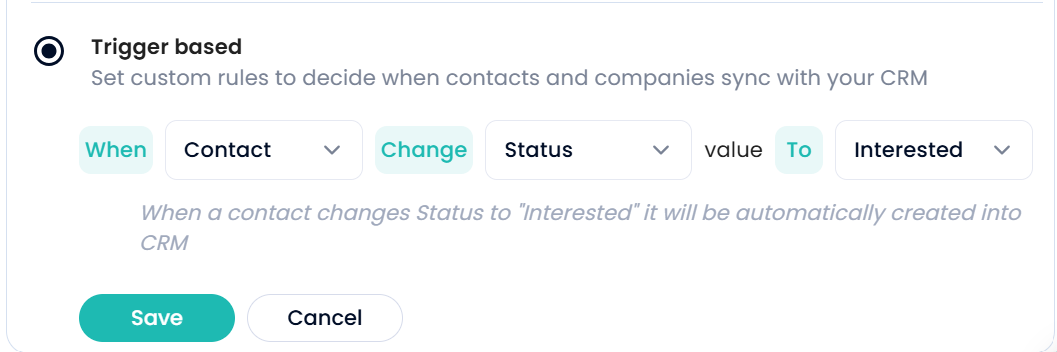
Choose Trigger based instead of Automatically or Manually.
Build the rule: when a Contact, Company (or Lead, where leads are enabled) changes its Status — or a Single-select or Multi-select custom field — to the values you pick, that record is pushed to the CRM.
Trigger-based sync covers contacts and companies only — it does not push deals or activities.
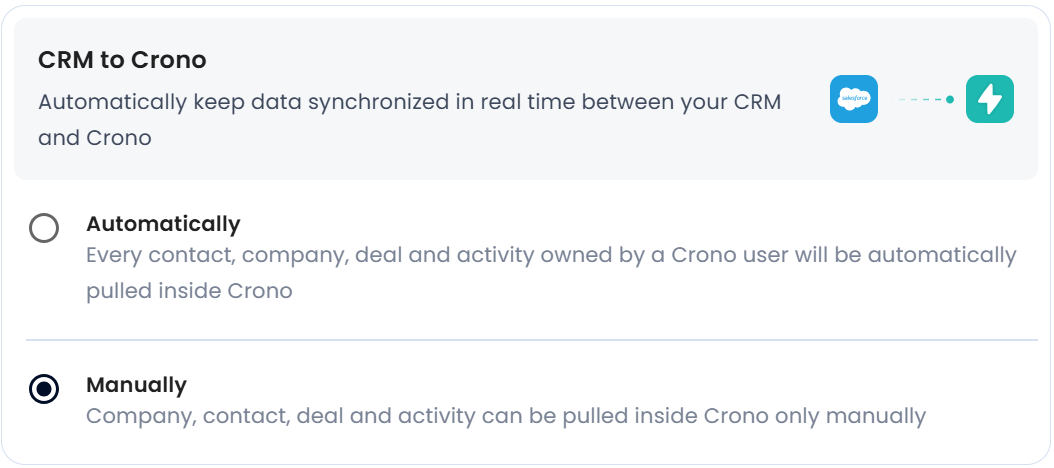
When Automatic Sync is active, any record assigned to a Crono user in your CRM or created there by the Crono user will automatically appear in Crono.
This native, bidirectional integration ensures that your tasks, contacts, and companies stay aligned across both platforms in real time — without the need for manual updates.
On Salesforce, installing the Crono package in your Salesforce org is what makes the integration bidirectional. See How to install the Salesforce Package.
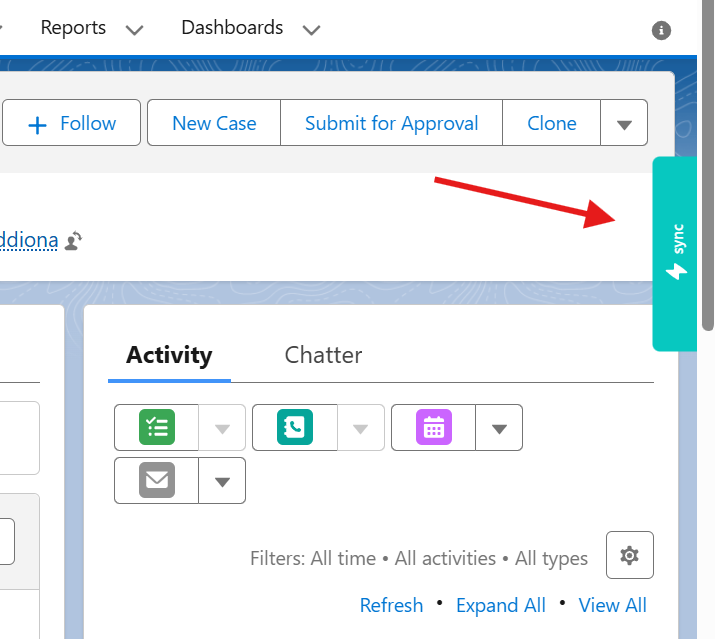
If you prefer to decide what comes into Crono, choose Manual mode.
From within your CRM, you can use the Crono Sync button to push selected contacts or companies into Crono manually.
This is perfect for teams who want to keep Crono focused on active leads, avoiding unnecessary noise.
Crono’s CRM integration gives you total control over your data flow.
Whether you prefer full automation, manual precision, or smart trigger-based workflows, you can configure the setup that best matches your team’s rhythm — keeping both Crono and your CRM perfectly in sync, on your terms.
